Quantity Takeoff from DWG and DXF
Open a DWG or DXF and read the quantities straight from the drawing: length and area per layer and the count of every block.
Free · runs in your browser · nothing is uploaded
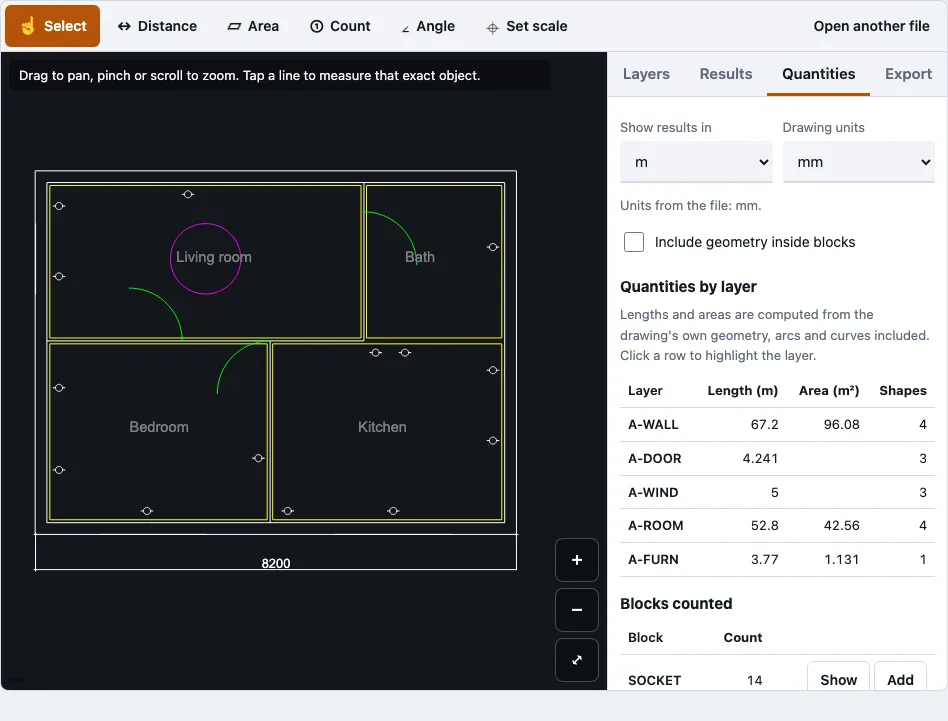
How to take off quantities from a DWG or DXF
- Open a DWG or DXF file. The first time you open one, the drawing reader is fetched; after that, the file panel shows the file details, including any paper-space layouts (counted but not drawn) and any records that had to be skipped.
- Check the units in the file panel. If the drawing has no unit setting, DrawTape guesses and tells you it guessed, so set the drawing units yourself.
- On the Quantities tab, read the total length, total area of closed shapes and shape count for each layer. Click a layer row to highlight it on the drawing.
- Turn on “Include geometry inside blocks” only if you want block contents counted. It is off by default so block symbols do not inflate lengths.
- Under block counts, click Show to highlight a block, then Add to put its count into the results.
- For anything not in the geometry, use the Distance, Area, Angle or Count tools and tap points. Finish, Undo point and Cancel control a measurement in progress.
- On the Results tab, name your categories, add measurements to them, and check the totals table for length, area and count.
- Copy the table or download the CSV.
You can show results in mm, cm, m, in or ft. Measurements are kept in your browser for each file name and size, so reopening the same file restores them. Each file is handled on its own; there is no batch mode.
What is the difference between a quantity takeoff and an estimate?
A quantity takeoff lists what has to be built, measured in lengths, areas, volumes and counts. An estimate takes those same quantities and adds unit prices, labour and markups to reach a cost. A takeoff gives quantities, not costs. A material takeoff is the same kind of list, focused on materials.
| Term | What it contains | Output |
|---|---|---|
| Quantity takeoff | Lengths, areas, volumes and counts measured from drawings | Quantities only |
| Material takeoff | The same measured list, used for materials | Quantities of materials |
| Estimate | Quantities plus unit prices, labour and markups | A cost |
DrawTape covers the first row: it produces quantities and leaves pricing to your estimate.
When does a shape count as an area?
A shape adds to the area total only when it is a closed polyline or its ends meet. Lines and open polylines add length only. Hatch areas subtract their holes, and annotation such as dimensions and leaders is left out of all totals.
| Case | Length | Area |
|---|---|---|
| Closed polyline, or ends that meet | Yes | Yes |
| Wall drawn as two open lines | Yes | No |
| Hatch with holes | Not applicable | Yes, holes subtracted |
| Dimensions and leaders | No | No |
| Block contents (switch off) | No | No |
What do the totals look like on the sample plan?
The “Try a sample floor plan” button opens a small apartment plan with known numbers, so you can check your reading before using your own drawing. Set the units to mm and the results to m, then compare the Quantities tab with this table.
| Layer or block | Length | Area | Count |
|---|---|---|---|
| A-WALL | 67.2 m | 96.08 m² | |
| A-ROOM | 52.8 m | 42.56 m² | |
| A-DOOR | 4.241 m | ||
| A-WIND | 5.0 m | ||
| A-FURN | 3.770 m | 1.131 m² | |
| SOCKET block | 14 |
The four rooms are 13.78, 11.10, 11.70 and 5.98 m², which add to 42.56 m². A-WALL has two closed outlines, 50.84 m² outside and 45.24 m² inside, and the tool adds closed shapes without subtracting one from the other, so its 96.08 m² is not a floor area. With “Include geometry inside blocks” on, the 14 socket symbols also add their circles and ticks to layer E-SOCKET.
How long should a quantity takeoff take?
The time depends on the size of the project, how complex the drawings are, and how clear the drawing quality is. Smaller, cleaner drawings take much less time than large sets with many layers and blocks.
How can digital tools help with quantity takeoff?
Digital tools measure from the file itself rather than by hand, which reduces counting and transcription errors. DrawTape reads exact geometry from DWG and DXF files and lets you tap points for anything the file does not contain.
How does quantity takeoff improve project accuracy?
A precise list of measured quantities gives a firmer base for estimating, purchasing and scheduling. Tying each number to a layer or block makes it easier to check against the drawing.
Where does quantity takeoff fit into the construction workflow?
It is used at every stage: early design and budgeting, procurement and scheduling, and final tracking. The same quantities can be reused as the project moves forward.
How this tool works and where the numbers come from
Per-layer totals were compared with a generated drawing whose lengths, areas and block counts are known exactly; the largest relative error was below one part in a million.
Sources
Questions and answers
What is a quantity takeoff?
A quantity takeoff (QTO) is the process of measuring and counting the materials and components shown on construction drawings. The result is a list of quantities such as lengths, areas and counts that can be used for costing and ordering.
What is a construction takeoff?
A construction takeoff is the same process applied to everything shown on the drawings that has to be built. It covers all trades, so it produces a wider list than a single material takeoff.
What is the difference between a quantity takeoff and a material takeoff?
A material takeoff is a quantity takeoff focused on materials. Both are lists of measured quantities, and neither includes prices or labour.
Is there free takeoff software?
DrawTape is free to use and needs no account, so you can measure a DWG or DXF file without paying. It handles quantities only, so you will still need a separate step for prices.
Can I do a quantity takeoff from a DWG file?
Yes. Open the DWG in DrawTape and read the Quantities tab. Versions tested include R14 through R2018. Password-protected files are refused, and external references are not loaded.
Can I do an AutoCAD quantity takeoff without AutoCAD?
Yes. DrawTape runs in the browser and reads DWG and DXF files directly, so you do not need to open them in AutoCAD. AutoCAD can save as DXF or DWG if your file is in another format.
Can I measure a PDF instead?
Yes, PDFs are opened with the pdf.js reader. Accuracy depends on the scale you set and on tapping at the right spot. Measure one dimension written on the drawing to check it; if the tool differs by more than 1 percent, the PDF may not have been printed at 100 percent.
Does DrawTape edit or upload my drawing?
No. The drawing is never uploaded, and the viewer shows, measures and exports only. It does not save changes back to DWG.
Related tools
- Construction takeoff: use it when you want a takeoff workflow for a full set of construction drawings.
- DWG viewer: use it when you only need to look at a DWG file and measure it.
- DXF viewer: use it when your drawing is saved as DXF from any CAD or laser-cutting program.
- Floor plan measurement tool: use it when you are measuring room sizes and plan dimensions.
- DWG to PDF: use it when you need a PDF copy of a DWG before measuring it.
- PDF measuring tool: use it when your plan is a PDF and you need to set a scale first.