PDF to DXF Converter
Drop a PDF drawing, choose the page and the scale, and download a DXF made from its vector lines.
Free · runs in your browser · nothing is uploaded
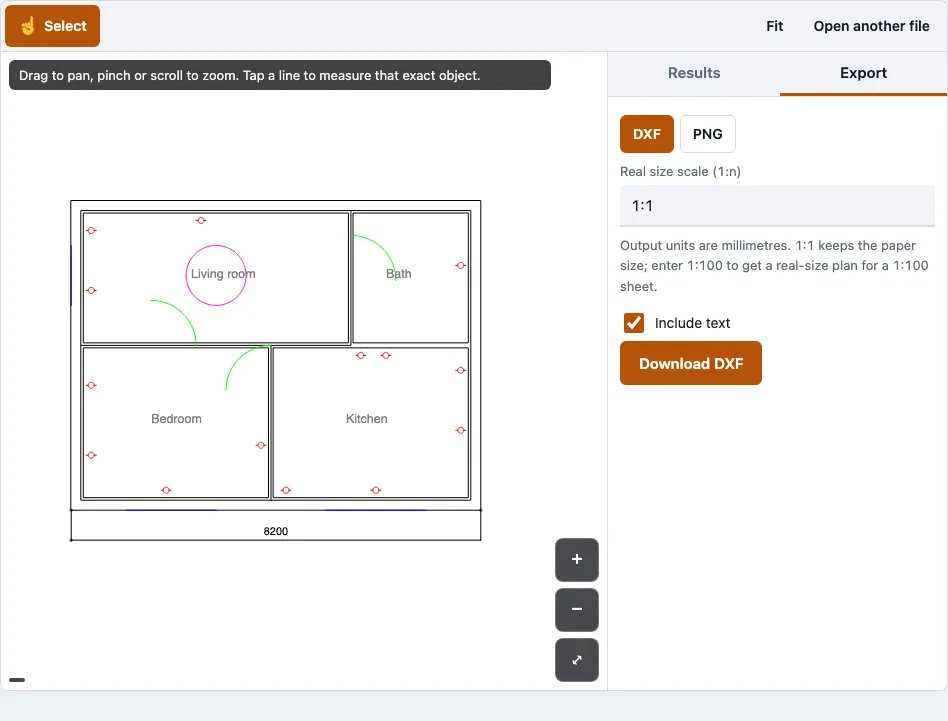
How to use the PDF to DXF converter
- Open your PDF in the tool. The first page opens by default.
- For a multi-page file, use the page selector to pick the page you want.
- In the Export tab, choose one page or all pages. All pages are placed side by side in the DXF.
- Enter a scale in the scale box. Use 1:1 to keep the paper size, or 1:100 to get a real-size plan from a sheet drawn at 1:100.
- Zoom in to check the drawing. The page is redrawn at each zoom level, so lines stay sharp.
- Open the Export tab, check that DXF is chosen, and download the file.
If the tool reports that the page has no vector lines, the PDF is a scan or an image. Use the vector original of the drawing instead. After saving, open the DXF in your CAD program, or in the DXF viewer on this site, to check the lines, layers and text. The layer names carry the original line colours, so you can select or hide a group of lines by colour.
Each file is handled one at a time, and there is no batch mode. On a phone, a very large file can run out of memory, so a desktop browser is safer for big drawings.
What is a DXF file?
A DXF file is a drawing file that stores 2D and 3D geometry so other CAD programs can read it. DXF stands for Drawing Exchange Format, and Autodesk developed it. Almost every CAD, CAM and laser-cutting program opens DXF files.
DXF is Autodesk’s documented exchange format. It is stored as tagged text (ASCII) or as binary. For the same drawing it is larger than a DWG file. The DXF this tool writes is R12, in millimetres.
What is the difference between DWG and DXF?
DWG is Autodesk’s binary drawing format, used by AutoCAD since 1982. DXF is Autodesk’s documented exchange format, built for moving drawings between programs. Both can hold 2D and 3D objects, layers, and blocks, and the same drawing can usually be saved in both.
| Feature | DWG | DXF |
|---|---|---|
| Storage | Binary | Tagged text or binary |
| Origin | Autodesk, used by AutoCAD since 1982 | Autodesk, documented exchange format |
| File size for the same drawing | Smaller | Larger |
| Software that reads it | AutoCAD and compatible programs | Almost every CAD, CAM and laser-cutting program |
| Output of this tool | No | Yes, DXF R12 in millimetres |
What becomes of each PDF object in the DXF?
Each kind of PDF object becomes a DXF entity as the table shows. Stroked lines become polylines on layers named after their colour, such as C_FF0000 for red. Filled shapes become closed outlines with no fill, and page text becomes text entities.
| In the PDF | In the DXF |
|---|---|
| Stroked line or path | A polyline on layer C_RRGGBB named after its colour |
| Filled shape | A closed polyline outline (no fill) |
| Bezier curve | 14 straight segments |
| Page text | A text entity |
| Line width | Not kept |
| Clipping paths | Ignored |
| Embedded images | Not converted |
| Scanned page | No lines; the tool says so |
Because the line work is read from a vector PDF, taps snap to line ends and corners when you measure.
How this tool works and where the numbers come from
Vector extraction follows the PDF operator list (paths, transformations, colours) as defined in ISO 32000-1; output was re-opened in the DXF reader in tests and the path count matched.
Sources
Questions and answers
How to convert PDF to DXF?
Open the PDF, choose the page, enter a scale, and save the result as DXF. The steps are listed above. The page must contain vector lines; a scanned page cannot be converted into line work.
Can I turn a PDF into a DXF?
Yes, provided the PDF holds vector lines, as most CAD exports and engineering sheets do. A PDF made only from a scan or an image has no vector lines, and the tool reports that rather than guessing lines from pixels.
How to convert PDF to DXF for free?
The tool is free to use and needs no account or sign-up. It runs in your browser, so there is nothing to install.
How can I be sure my DXF document is secure?
Your drawing is never uploaded. It is read in the browser tab, and no request carries the file. In a browser test, no request carried the file, and a second DWG still opened with the network switched off.
Can I get a DWG file from this tool?
No. The output is DXF only. To get DWG, open the DXF in your CAD program and save it as DWG.
Why does my scanned PDF show no lines?
A scanned page is an image, so it has no vector paths to convert. Points placed on a scan do not snap to line ends. Use the vector PDF from the original drawing program if you need lines.
Can I convert several PDFs at once?
No. The tool works on one file at a time and has no batch mode. For a multi-page PDF, you can choose one page or all pages.
Does it work on a phone?
The layout was tested at 375 px wide with touch. A very large file can run out of memory on a real phone, so smaller PDFs are the safer choice there.
Related tools
- PDF measuring tool: use it when you need lengths or areas from a PDF before or instead of converting.
- DXF viewer: use it to open and check a DXF file in the browser.
- DWG to PDF: use it when you start from an AutoCAD drawing and need a PDF.
- DWG to DXF: use it when your source file is a DWG and you need a DXF.
- Floor plan measurement tool: use it to measure rooms and walls on a floor plan.
- Quantity takeoff: use it to total lengths and areas once the lines are in CAD form.