Open a DWG File
Drop the DWG file here to see the drawing at once. Zoom, check layers, measure, or save it as PDF or DXF.
Free · runs in your browser · nothing is uploaded
You can open a DWG file without AutoCAD by using this free DWG viewer, which draws the drawing in your browser tab. No software to install and no sign-up are needed. The file is read in the tab and is never uploaded, so the drawing does not leave your device while it opens.
Once a drawing is open, you can switch layers on and off, zoom and pan, and measure lengths, areas and angles from the geometry. You can also export the view as a vector PDF, as a PNG or JPG image, as an SVG, or as a DXF file in versions R12 to R2018. The viewer was tested with DWG files from R14 through R2018 and with DXF files. It does not edit the drawing or save changes back to DWG.
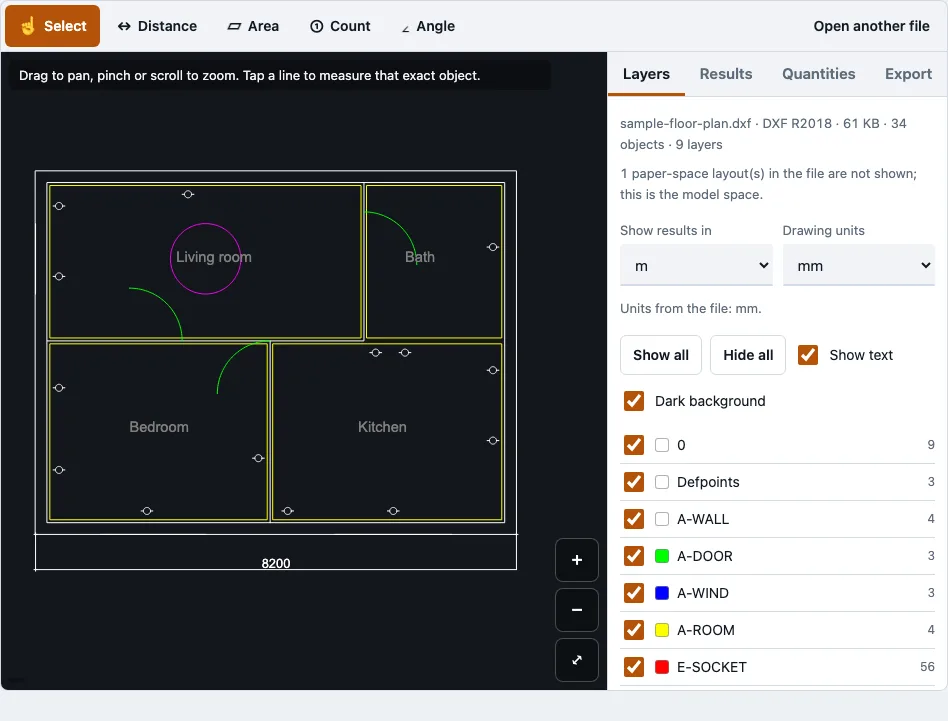
How to use the DWG viewer
- Use the file picker at the top of the page to choose your .dwg or .dxf file. Files up to 200 MB are accepted.
- Wait for the drawing to appear. The drawing reader loads the first time you open a DWG or DXF.
- Read the file panel. It counts the objects and says if any records had to be skipped.
- Open the Layers panel and tick the layers you want to see. Show all, Hide all, Show text and Dark background change the view in one click.
- Zoom with pinch, the mouse wheel or the plus and minus buttons. Drag to pan, and press Fit to frame the visible layers. The cursor position appears in the corner.
- Pick a measuring tool: Select, Distance, Area, Angle or Count. With Select, tap a line to see its type, layer, block name, exact length and area.
- For Distance, add points to measure several segments and read the running total. Points snap to the nearest line end, corner or vertex within 14 screen pixels. Use Undo point to step back, Finish to end a measurement, or Cancel to drop it.
- Open the Export tab and choose PDF, PNG, JPG, SVG or DXF, then download.
The PDF option shows a preview of the page before you save it, so check the paper size and scale there. The PDF is vector output, which keeps lines sharp when you print it from a PDF reader.
What is a DWG file?
A DWG file is Autodesk’s binary drawing format, used by AutoCAD since 1982 to store 2D and 3D design drawings. It holds layers, blocks and layouts, and it is closely tied to CAD programs. The name is short for “drawing.”
How to open a DWG file without AutoCAD?
You can open a DWG file without AutoCAD in three ways: with another CAD program, with a dedicated CAD viewer installed on your computer, or with an online viewer that runs in the browser. This page takes the browser route, so there is nothing to install. A viewer shows and measures a drawing, but it does not edit it.
Why a DWG file will not open
A DWG usually fails for one of seven reasons, and the viewer shows a message for most of them. Check these in order:
- Not a DWG or DXF it can read. Confirm the file extension and that a CAD program saved it.
- Password protected. The viewer refuses these. Remove the password in the program that saved the file, then save it again.
- Version too old (R12/R13). These were not available for testing. Save the drawing again in a newer DWG version (R14 to R2018 were tested) or as DXF.
- Damaged or cut off. Download or copy the file again. For R2010 and later, the file panel reports any skipped records.
- Larger than 200 MB. Files of that size are refused.
- Browser out of memory. This is more likely on phones. A 20 MB test file used about 544 MB, so try a desktop browser.
- Opened but nothing to draw. Only model space is drawn. If everything sits in paper space, the view stays empty.
The viewer also leaves some content out on purpose:
| Not drawn | What you see instead |
|---|---|
| External references (xrefs) | Only the drawing’s own geometry |
| Paper-space layouts | Counted in the file panel, not drawn |
| Hatch patterns and gradients | Hatch outlines and solid fills are drawn |
| Exact linetype dash patterns | Dashed, centre, hidden and dot classes are shown |
| SHX and TrueType font shapes | Text is drawn in the system font |
| 3D solids, regions, meshes without display graphics | Skipped and listed in the file panel with a count |
How do I open a DWG file as a PDF or convert it to JPG?
Open the drawing, then open the Export tab and choose PDF for a one-page vector PDF, or the PNG or JPG option for an image. The PDF follows the paper size, orientation, scale and line weight you choose. The image is saved at 1024, 2048, 4096 or 8192 pixels wide.
- Hide any layers you do not want in the output, using the Layers panel.
- For a PDF, open the Export tab and choose PDF. Choose a paper size (A0 to A4, Letter, Legal, Tabloid, ANSI C to E, or ARCH C to E), an orientation, and either fit to page or a fixed scale such as 1:100. A warning appears if the drawing does not fit at that scale.
- Choose colour, black on white or greyscale, a line weight, and whether text is on. Check the preview.
- For an image, open the Export tab and choose PNG or JPG, pick the width and a white or dark background. PNG can also be transparent.
PDF text uses the Helvetica font with Latin-1 characters. Other characters, such as Chinese, are left out and the number of omitted characters is reported.
How this tool works and where the numbers come from
The messages in the troubleshooting list are the ones the tool shows; the cases were provoked with truncated, damaged and non-CAD files in tests.
Sources
Questions and answers
Can I view DWG files on mobile?
Yes. The layout was tested at 375 px wide with touch emulation, so you can pinch to zoom, drag to pan and tap a line to read its details. Very large files can run out of memory on a phone, so use a desktop browser for big drawings.
Is there a risk of data leakage when opening DWG files online?
This viewer does not upload your file. In a browser test, no request carried the file, and only the page and the drawing reader were downloaded. Some online viewers do send files to a server, so check how any viewer you use handles yours.
Is DWG a 3D format?
DWG can store both 2D and 3D objects. This viewer draws 3D faces but skips 3D solids, regions and meshes that carry no stored display graphics, and the file panel lists each skipped type.
What does DWG stand for?
DWG is short for “drawing.” AutoCAD made the format common, but other programs read it too.
How to view dwg/dxf files online?
Choose your DWG or DXF file with the file picker at the top of the page, and the drawing is drawn in the tab. You can also export a drawing as DXF in a version from R12 to R2018 when another program needs it.
Why can’t I still open my DWG file?
Go through the seven checks under “Why a DWG file will not open,” starting with the message the viewer shows. If memory is the problem, try a desktop browser or a smaller file.
Can I open a password-protected DWG file?
No. The viewer refuses password-protected DWG files and shows a message. Remove the password in the program that saved the file, then save it again.
Can I open a DXF file here?
Yes. The same viewer opens DXF files. Tests covered R12 in ASCII and binary, R2004 binary and R2018 ASCII.
Related tools
- DWG viewer: use it when you want to browse the full drawing, layers and measurements.
- DWG to PDF: use it when you need a printable PDF of the drawing.
- DWG to DXF: use it when another CAD or laser-cutting program needs a DXF file.
- DXF viewer: use it when your file is already a DXF.
- DWG to PNG: use it when you want a PNG or JPG image of the drawing.
- DWG viewer for Mac: use it if you are opening the file on a Mac.