Floor Plan Measurement Tool
Open a floor plan as PDF, image, DXF or DWG, set the scale from one known length, and measure rooms, walls and areas.
Free · runs in your browser · nothing is uploaded
How to use the Floor Plan Measurement Tool
- Click the file picker and open your floor plan (PDF, PNG, JPG, DWG or DXF), or press “Try a sample floor plan” to practise first.
- If a PDF has several pages, use the page selector to pick the plan page. The first page opens by default.
- For a PDF or image, set the scale. Type a ratio such as 1:100, or an imperial scale such as 1/4"=1’-0". You can also tap two points whose real distance you know and enter it in m, mm, cm, ft or in. DWG and DXF files skip this step because their units come from the file.
- Choose a tool: Select, Distance, Area, Angle or Count.
- Tap your points on the drawing. Points snap to the nearest line end, corner or vertex within 14 screen pixels.
- Press Finish to close a measurement, Undo point to remove the last point, or Cancel to drop it.
- Open the Results tab, name your categories, and check the totals table. Use the CSV button to download the figures, or the copy button to paste them into a spreadsheet.
Zoom in or out as much as you need, because the plan is redrawn at each zoom level and lines stay sharp. The clear button removes all measurements from the Results tab.
How do I calculate the area of a room?
For a rectangular room, multiply the length by the width. A 12 ft x 15 ft room is 12 × 15 = 180 sq ft. For other shapes, split the room into rectangles, or trace the corners with the Area tool, which returns the polygon area and perimeter.
- Set the scale first on a PDF or image, so the tool reads real units.
- Tap each corner with the Area tool, or tap a closed room outline with Select on a vector PDF or DWG.
- Read the area and perimeter, then save the result to a category in the Results tab.
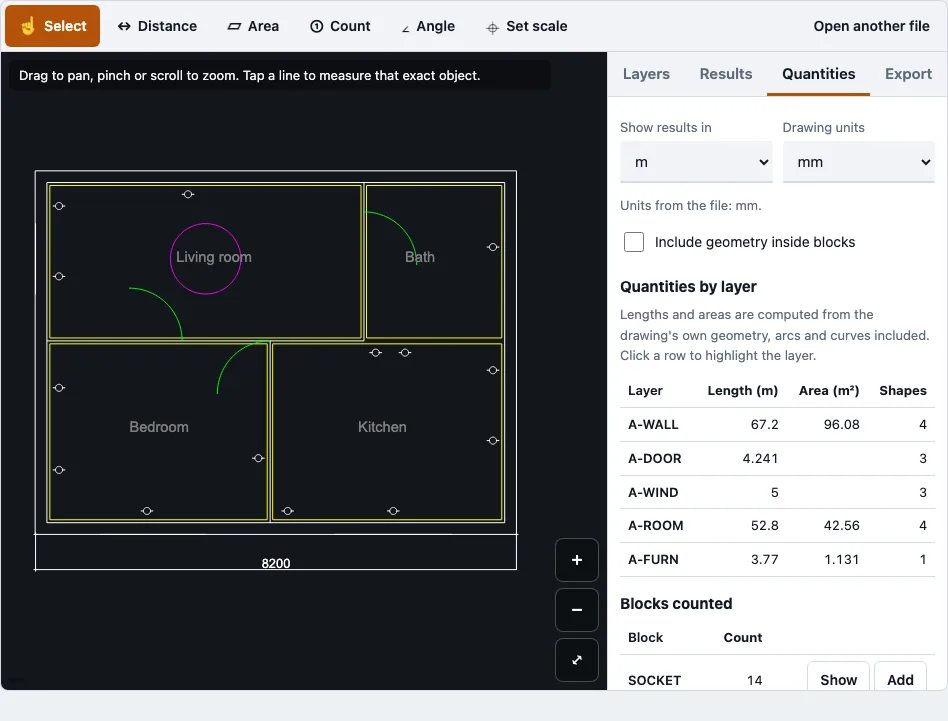
On the sample plan, the living room is 5.30 by 2.60 m, so 5.30 × 2.60 = 13.78 m², with a perimeter of 15.8 m. The four rooms add up to 42.56 m². Tapping the room outline with Select shows 13.78 m², and tracing the corners with the Area tool gives the same figure when each corner snaps to a line end.
With your own plan, the result is only as exact as the line work. A scanned PDF or image has no vector lines, so points land wherever you tap, and you should check the area against a dimension written on the drawing.
How do I convert square feet to square meters?
Multiply the area in square feet by 0.092903, or divide it by 10.764, to get square meters. For example, a 180 sq ft room is about 16.72 m² (180 × 0.092903 ≈ 16.72). Round only at the end of your calculation so the rounding error stays small.
What scale should I use for a floor plan?
Use the scale printed on your drawing. Metric plans are usually 1:50 or 1:100, and United States plans are often 1/4"=1’-0" or 1/8"=1’-0". The tool accepts a ratio, an imperial scale, or a two-point calibration.
| Scale | Ratio | Where it is common |
|---|---|---|
| 1:50 | 1:50 | Metric countries |
| 1:100 | 1:100 | Metric countries |
| 1/4"=1’-0" | 1:48 | United States |
| 1/8"=1’-0" | 1:96 | United States |
Scale ratios assume the PDF is printed at 100 % size. If a dimension written on the drawing differs from the tool’s number by more than 1 %, the PDF was probably not printed at full size, or the title block scale is wrong.
What are typical floor plan dimensions?
Typical dimensions vary depending on the type of property, so there is no single standard size. The sample apartment plan on this page measures 8,200 by 6,200 mm over the wall faces, which is one example.
How this tool works and where the numbers come from
Room areas on the sample plan were computed from the generator coordinates and match the tool’s output; the area formula is the shoelace formula.
Sources
Questions and answers
How accurate are the measurements?
Accuracy on a PDF or image depends on the scale you set and on where you tap. Vector PDFs snap to line ends and corners, so they are the most precise. Check one dimension written on the drawing against the tool’s result.
What file types can I upload?
You can open PDF, PNG, JPG, DWG and DXF files. PDF pages open with pdf.js, and PNG and JPG plans are scaled with two points. DWG and DXF need no scale because their units are read from the file.
Is my floor plan data private?
Yes. The drawing is read in your browser tab and is never uploaded, and no request carries the file. Only the page, the drawing reader and, for PDFs, the pdf.js reader are downloaded.
Can I save and come back later?
Measurements are saved in this browser for each file name and size. When you open the same file again, they are restored. Switching browsers or clearing your browser data will remove them.
Does it work on mobile?
The layout was tested at 375 px wide with touch emulation. On a real phone, very large DWG files can run out of memory, because a 20 MB test file used about 544 MB. Smaller PDFs and images are the safest choice on a phone.
Is there a free floor plan tool?
Yes. This tool and the other tools on this site are free to use and need no account or sign-up.
Can I measure the total area of a floor plan?
Yes. Trace the outer outline of the building with the Area tool to get the polygon area and perimeter, or measure each room and add the results. The sample plan’s four rooms total 42.56 m².
Do I need to set a scale for a DWG or DXF file?
No. The drawing units are read from the file’s INSUNITS setting. If the file has none, the tool guesses the units and lets you change them.
Related tools
- PDF measuring tool: use it when your plan is a PDF and you mainly need lengths and areas from it.
- Construction takeoff: use it when you are listing quantities across a full set of drawings.
- Quantity takeoff: use it to see how measured lengths, areas and counts are gathered into a list.
- DWG viewer: use it to open and measure a DWG file directly.
- PDF to DXF: use it when you need your plan in DXF format for other CAD programs.
- DXF viewer: use it when your plan is a DXF file and you want to see its layers.