DXF Viewer
Open an ASCII or binary DXF file, switch layers, measure lengths and areas and export to PDF, PNG or SVG, all in the browser.
Free · runs in your browser · nothing is uploaded
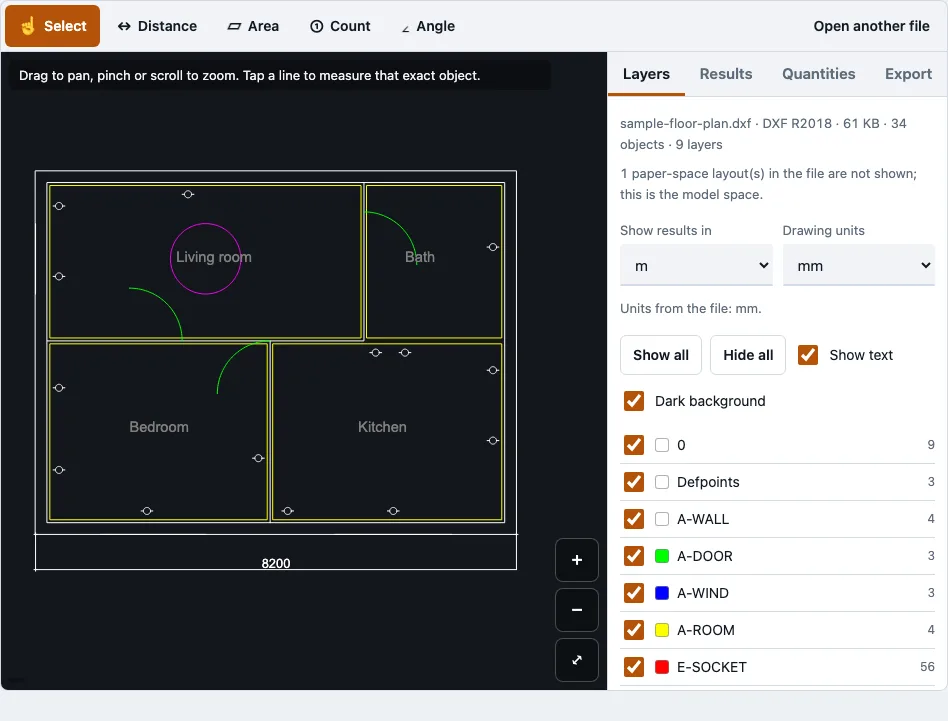
How to use the DXF viewer
- Drag your .dxf file onto the page, or click the drop area to choose one from your device.
- Wait for the drawing to appear. The first DXF or DWG you open loads the drawing reader, a file of about 0.7 MB compressed.
- Read the file panel. It shows the file name, format and release, size, object count, layer count, skipped object types and the number of paper-space layouts.
- Open the Layers panel and tick or untick each layer. Show all, Hide all, Show text and Dark background change what you see. Layers that are off or frozen in the file are greyed out.
- Zoom with pinch, the mouse wheel or the plus and minus buttons. Drag to pan, and press Fit to frame the visible layers.
- Choose a measuring tool: Select, Distance, Area, Angle or Count. Points snap to the nearest line end, corner or vertex within 14 screen pixels. Use Finish, Undo point or Cancel while a measurement is in progress.
- Open the Quantities tab for the total length and area per layer, the shape count, and the block counts.
- Open the Export tab and choose PDF, set the paper, orientation, scale, colour, line weight and text, check the preview, then export.
Only the model space is drawn, so paper-space layouts are counted but not shown. Files up to 200 MB are accepted, one file at a time.
What is the difference between DXF and DWG?
DWG is Autodesk’s binary drawing format, used by AutoCAD since 1982, and it can hold 2D and 3D objects, layers, blocks and layouts. DXF is Autodesk’s documented exchange format, stored as tagged text (ASCII) or as binary. The same drawing can usually be saved in both formats.
| DWG | DXF | |
|---|---|---|
| Format | Autodesk binary drawing format | Documented exchange format, ASCII or binary |
| Typical use | Native AutoCAD files | Passing drawings between CAD, CAM and laser-cutting programs |
| Openness | Native format | Documented by Autodesk |
| File size for the same drawing | Usually smaller | Larger |
This viewer opens both formats. If your file is DWG and you need DXF for another program, the DWG to DXF tool can save it in a DXF version from R12 to R2018.
How to convert a DXF file to PDF?
Open the DXF in this viewer, then open the Export tab and choose PDF. The output is one vector page sized to the paper you choose. You can fit the drawing to the page or use a fixed print scale such as 1:100, and a preview shows the page before you save.
- Open the file and switch off any layers you do not want printed.
- Open the Export tab and choose PDF.
- Choose a paper size: A0 to A4, Letter, Legal, Tabloid, ANSI C, D or E, or ARCH C, D or E.
- Set the orientation to automatic, landscape or portrait.
- Set the scale to fit the page, or a fixed scale such as 1:100. If the drawing does not fit at that scale, a warning appears.
- Pick colour, black on white or greyscale, and a line weight: thin (0.13 mm), normal (0.25 mm), bold (0.5 mm) or taken from the drawing.
- Turn text on or off, and check the preview.
- Export the PDF.
PDF text uses the Helvetica font and Latin-1 characters. Other characters, such as Chinese, are left out, and the tool reports how many were skipped.
How this tool works and where the numbers come from
DXF files in R12, R2000, R2004 (binary) and R2018 were opened in a browser test; generated drawings with known lengths, areas and block counts were compared with the Quantities tab.
Sources
Questions and answers
How do I open a DXF file online for free?
Drag your .dxf file onto this page, or click the drop area to select it. The drawing opens in the browser tab at no cost, and you do not need an account.
What is a DXF file?
DXF stands for Drawing Exchange Format. Autodesk documents it as a way to pass CAD drawings between programs, and it can be stored as text or as binary. Most CAD, CAM and laser-cutting programs can read it.
Which DXF versions are supported?
In testing, the viewer opened DXF files in R12 (ASCII and binary), R2004 (binary), R2000 and R2018 (ASCII). DWG files from R14 to R2018 were also opened in tests. Check the release shown in the file panel after opening, since releases outside the tested list were not part of these tests.
Is viewing DXF files private?
Yes. The drawing is read in your browser tab and is never uploaded, so no request carries your file. The only downloads are the page itself, the drawing reader and, for PDFs, the PDF reader.
Can I measure distances in my DXF drawing?
Yes. Choose the Distance tool, then tap two points. The Distance tool takes several segments and shows a running total. Points snap to the nearest line end, corner or vertex within 14 screen pixels, and tapping a single line with Select shows its exact length.
What program will open a DXF file?
Most CAD, CAM and laser-cutting programs read DXF, and AutoCAD can save and open it. If you only need to look at or measure a drawing, this browser viewer works without installing a program.
What is the best free DXF viewer app?
The best choice depends on the job. This page is free, needs no sign-up and runs in a browser on a computer or phone. Very large files can run out of memory on a phone, so a computer is better for those.
How do I get the total length and area of each layer?
Open the Quantities tab, which lists the total length, the total area of closed shapes and the shape count for each layer. Lengths and areas come from exact geometry, not from the drawn segments. Generated DXF files with known answers, in R12, R2000 and R2018, both ASCII and binary, gave a largest relative error of 2.2e-11. SVG export keeps a real size in millimetres when the units are known, which helps laser and CNC work.
Related tools
- DWG viewer when your file is a DWG rather than a DXF.
- DXF to PDF when you only need a PDF and no viewing or measuring.
- DXF to SVG when you need the drawing as SVG vector paths.
- DWG to DXF when another program needs DXF and you start from DWG.
- Quantity takeoff when you are totalling lengths, areas or blocks for a takeoff.
- PDF to DXF when your drawing exists only as a PDF.