DXF to SVG Converter
Drop a DXF, hide the layers you do not want, and download an SVG that keeps its real size in millimetres.
Free · runs in your browser · nothing is uploaded
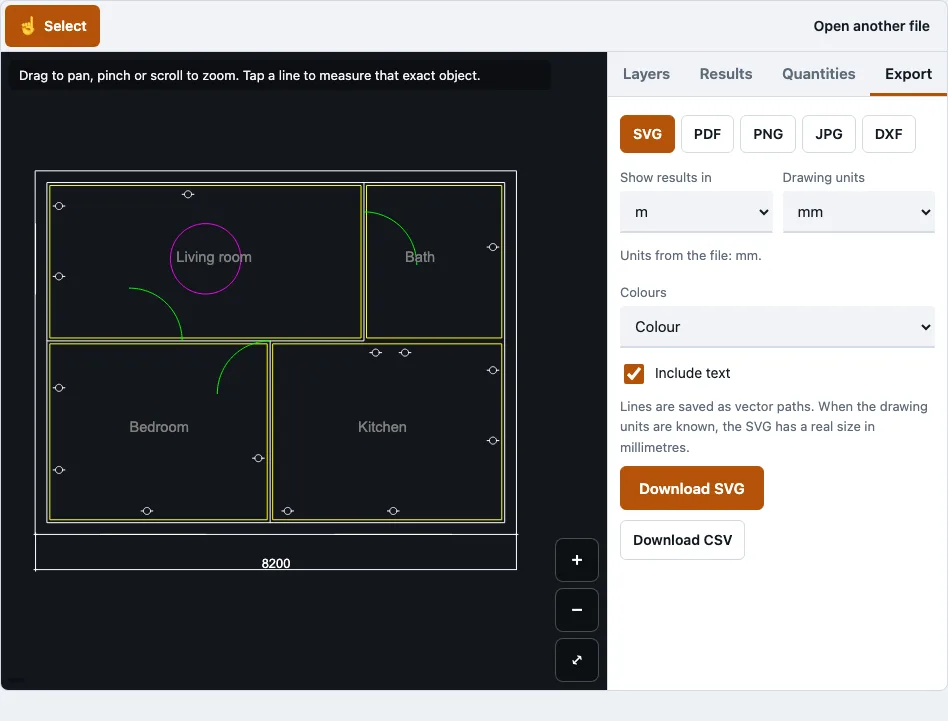
How to use the DXF to SVG converter
- Open your DXF file with the tool at the top of this page.
- Wait for the drawing reader to load. The first time you open a DWG or DXF, it downloads, at about 0.7 MB compressed.
- Read the file panel. It lists each skipped object type with its count, and it shows paper-space layouts, which are counted but not drawn.
- In the Layers panel, tick the layers you want. Use Show all or Hide all to start from a clean state, and turn on Show text if your labels matter.
- Zoom with pinch, the wheel, or the plus and minus buttons. Drag to pan, and press Fit to frame the visible layers. The cursor position appears in the corner.
- Check the Drawing units setting before you export.
- Open the Export tab, choose SVG, pick colour or black, and download it. The tool shows the file size after saving.
The Dark background switch is for viewing the drawing on screen while you check it. Keep your layer choices in place before you save, because the export follows what is visible. Every visible layer ends up in the file, so hide dimensions or construction lines you do not want cut or engraved. The SVG keeps one path per colour, so it stays small and opens quickly in vector editors.
Can I convert a DXF file to SVG?
Yes. This tool reads a DXF file in your browser tab and exports its visible model-space geometry as an SVG file. Polylines become paths, text becomes text elements, and the drawing is flipped so that Y points down, which is how SVG expects coordinates.
DXF is Autodesk’s documented exchange format, and most CAD, CAM and laser-cutting programs read it. SVG is a vector format that Inkscape and Adobe Illustrator open, so the converted file can go into those programs for editing.
How to convert DXF to SVG for free online?
Open the DXF in this free tool, tick the layers you want, confirm the drawing units, and save the SVG. No account is needed, and the drawing stays on your device for the whole process. The steps below follow that order.
- Open the DXF file in the tool at the top of this page.
- In the Layers panel, tick the layers to keep. Layers that are off or frozen in the file are greyed out, so check there first if part of the drawing is missing.
- Check the Drawing units. If they were guessed, correct them now, because the SVG size depends on them.
- Open the Export tab, choose SVG, download it and note the file size the tool shows.
Does the SVG keep its real size?
Yes, when the drawing’s units are known. The SVG gets width and height in millimetres from those units, so laser, vinyl and engraving software read it at real size. If the units are guessed, the size can be wrong, so check the Drawing units setting first.
The sample drawing has extents of 8,253 by 6,827 mm, and its SVG is 8253 mm wide and 6827 mm high. Compare the same figures with your own drawing before you send the file to a cutter.
What changes when a DXF becomes an SVG?
Curves are simplified, and a few object types are left out. Arcs, circles, ellipses and splines are written as short straight segments, so a curve becomes a chain of short lines. Hatch patterns are not drawn, but hatch outlines and solid fills are.
External references (xrefs) are not loaded, and only model space is drawn, so paper-space layouts are missing. Text is drawn in the system font rather than SHX or TrueType shapes. Strokes are colour or black. The file panel lists every skipped object type with its count.
How this tool works and where the numbers come from
SVG output was parsed back in tests (viewBox and size in mm match the drawing extents).
Sources
Questions and answers
What is a free tool to convert files to SVG?
This DXF to SVG converter is free, and it needs no account or sign-up. It opens DWG and DXF drawings and exports the drawing as SVG, one file at a time.
Which DXF and DWG versions can it read?
DWG versions tested include R14, R2000, R2004, R2007, R2010, R2013 and R2018. DXF tested includes R12 in ASCII and binary, R2004 binary, and R2018 ASCII, along with R2000 and R2018 files written by ezdxf.
Does the tool upload my drawing?
No. The drawing is read in the browser tab, and no request carries the file. In a browser test, a second DWG still opened after the network was switched off.
Why is part of my drawing missing from the SVG?
Only model space is drawn, and external references are not loaded. Hatch patterns and gradients are skipped, as are 3D solids, regions or meshes that have no stored display graphics. Check the file panel for the count of each skipped type.
Can I open the SVG in Inkscape or Illustrator?
Yes. SVG is an open vector format, and both Inkscape and Adobe Illustrator can open it for editing.
Related tools
- DXF viewer: use it to check layers and geometry before you export.
- DXF to PDF: use it when you need a PDF rather than an SVG.
- DWG to PNG and JPG: use it when you need a raster image of a DWG drawing.
- DWG to DXF: use it when your drawing is DWG and you need a DXF first.
- DWG viewer: use it to look through a DWG drawing before any conversion.
- PDF to DXF: use it when your source is a vector PDF and you need DXF lines.