DWG Viewer
Open a DWG file, turn layers on and off, measure and count, and export, without AutoCAD and without uploading the file.
Free · runs in your browser · nothing is uploaded
How to use the DrawTape DWG viewer
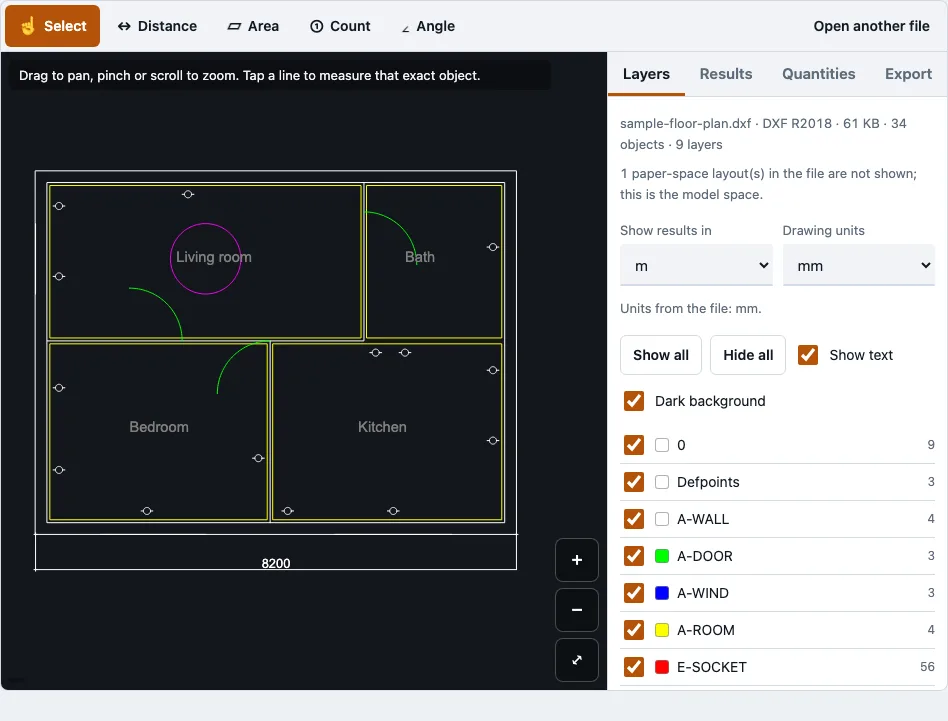
- Open your DWG or DXF file in the tool above. The first time, the browser also fetches the drawing reader, about 0.7 MB compressed. Or press “Try a sample floor plan” to test the tool first.
- Read the file panel. It shows the file name, format and release, size, object count, layer count, any skipped object types and the number of paper-space layouts.
- Open the Layers panel. Tick or untick each layer’s check box, or use Show all, Hide all, Show text and Dark background. Layers that are off or frozen in the file are greyed out.
- Zoom with pinch, the mouse wheel or the plus and minus buttons. Drag to pan, and press Fit to frame the visible layers. The cursor position shows in the corner.
- Pick a measuring tool: Select, Distance, Area, Angle or Count. Tap points on the drawing. Points snap to the nearest line end, corner or vertex within 14 screen pixels.
- Use Finish to complete a measurement, Undo point to remove the last point, or Cancel to drop it.
- Open the Quantities tab for total length and area per layer, shape counts and block counts.
- Open the Export tab and choose PDF, set paper size, orientation, scale, colour, line weight and text, check the preview, then export.
Only the model space is drawn, so use the file panel to see how many paper-space layouts the file holds.
Which DWG versions can I open?
The viewer opened every DWG release in the tests below, from R14 to R2018, using the same sample drawing saved in each release. R2010 and later files are read with error recovery switched on, and the file panel tells you when any records were skipped. Password-protected files are refused with a message. R12 and R13 DWG files were not available for testing.
DWG versions tested
| AutoCAD release | File code | Result in the test | Objects in the sample drawing |
|---|---|---|---|
| R14 | AC1014 | opens | 163 |
| R2000 | AC1015 | opens | 163 |
| R2004 | AC1018 | opens | 163 |
| R2007 | AC1021 | opens | 163 |
| R2010 | AC1024 | opens, error recovery on, no records skipped | 163 |
| R2013 | AC1027 | opens, error recovery on, no records skipped | 163 |
| R2018 | AC1032 | opens, error recovery on, no records skipped | 163 |
The DXF tests were R12 in ASCII and binary, which both open, R2018 ASCII, which opens, and R2004 binary, which opens with 2 records skipped.
DWG vs DXF: what is the difference?
DWG is the native binary format that AutoCAD uses to save working drawings. DXF is a documented exchange format that most CAD, CAM and laser-cutting programs can read. The same drawing can usually be saved as either, but the two suit different jobs.
| Feature | DWG | DXF |
|---|---|---|
| Purpose | Native working drawing | CAD data exchange |
| Encoding | Compact binary data | Usually readable ASCII text |
| Typical size | Usually smaller | Usually larger |
| Best used for | Complete project drawings | Moving drawings between programs |
How can I open a DWG file as a PDF?
Use the PDF option in the Export tab. The output is vector, on one page, with paper sizes from A0 to A4, Letter, ARCH and more. You can set a fixed print scale such as 1:100, and the tool warns when the drawing does not fit. PDF text uses Helvetica and Latin-1 characters, so other characters are left out and the count is reported.
Are the measured lengths exact?
They come from the drawing geometry, not from the drawn segments. Arcs use radius times sweep, ellipses and splines are integrated numerically, and hatch areas subtract holes. On drawings with known answers, the largest relative error was 2.2e-11.
What is not drawn?
Hatch patterns and gradients are not drawn, though hatch outlines and solid fills are. Exact linetype dash patterns, SHX and TrueType font shapes, and 3D solids, regions or meshes without stored display graphics are also left out. The file panel lists every skipped object type with its count.
How this tool works and where the numbers come from
Each DWG release in the table was opened from a sample file in a browser test, and the numbers in the table are the object counts and read times from that run. Lengths and areas were compared with drawings generated with known answers.
Sources
Questions and answers
How can I view a DWG file online?
Open the file in the tool above and the drawing appears in your browser tab. You do not need AutoCAD, and the steps are listed above. Large drawings take a little longer on the first open.
Is there a free DWG viewer?
Yes. The tools on this site are free and need no account or sign-up. You can open a DWG or DXF file, inspect it, and measure it at no cost.
What is the maximum DWG file size?
Files up to 200 MB are accepted. In headless Chromium tests, an 8 MB drawing with 52,025 polylines was read in 0.6 s and a 20 MB drawing in 1.7 s. On a phone, a very large file can run out of memory, because the 20 MB test file used about 544 MB of WebAssembly memory.
Are DWG files uploaded to a server?
No. The drawing is read in your browser tab and is never uploaded, and no request carries the file. The only downloads are the page, the drawing reader and, when you open a PDF, the pdf.js reader. A test confirmed that a second DWG still opened with the network switched off.
Can I edit and save DWG files here?
No. The viewer shows, measures and exports drawings. It does not edit or save back to DWG, so use AutoCAD or another CAD program for changes.
Do I need AutoCAD to open a DWG file?
No. The browser viewer lets you inspect a drawing without AutoCAD or another desktop CAD installation.
Why are referenced drawings or objects missing?
External references (xrefs) are not loaded, so a drawing that depends on other DWG files shows only its own geometry. Objects made by add-on applications are drawn only when the DWG stores their display graphics, so some of them can be missing.
Can I use this DWG viewer on Windows, Mac or Linux?
The viewer runs in a browser tab, so it works wherever your browser does. Very large drawings need a lot of memory, so a computer suits them better than a phone. The layout was tested at 375 px wide with touch emulation in Chromium, and the page and reader were opened in WebKit.
Related tools
- DXF viewer: use it when your file is a DXF rather than a DWG.
- Open a DWG file: use it for a step-by-step look at opening DWG files.
- DWG to PDF: use it when you only need a printable PDF of the drawing.
- DWG to DXF: use it when a program needs the drawing in DXF format.
- Quantity takeoff: use it to total lengths, areas and block counts for estimating.
- DWG viewer for Mac: use it if you are working on a Mac.