DWG Viewer for Mac
No download, no installer: open a DWG in Safari or Chrome on your Mac, check layers, measure and export.
Free · runs in your browser · nothing is uploaded
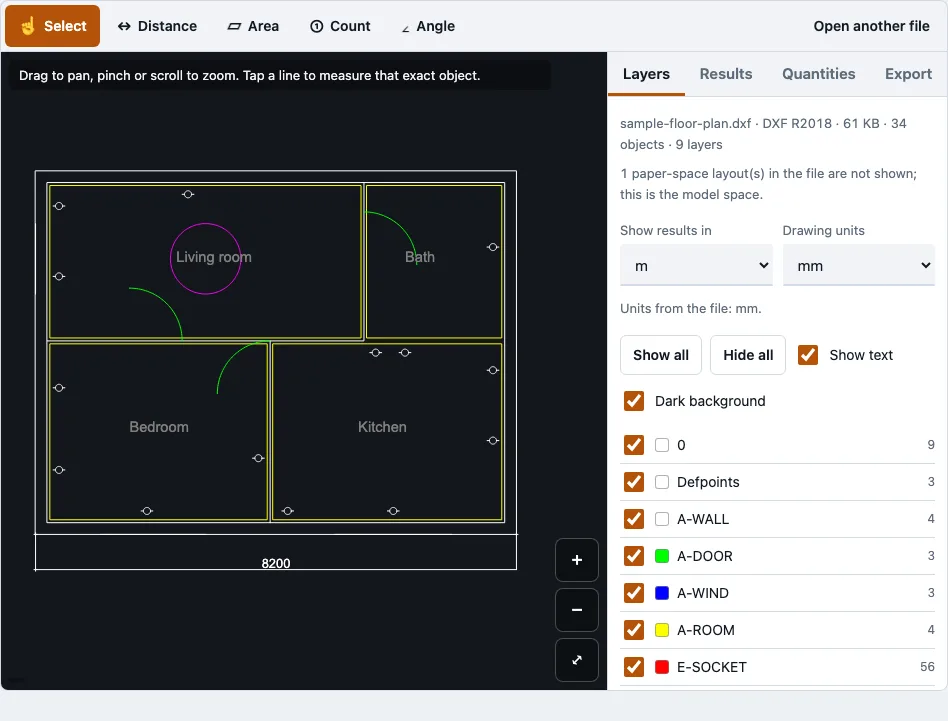
How to use the DWG viewer
- Open this page in Safari or Chrome on your Mac.
- Click to choose your DWG file, or drag the file onto the page.
- Wait for the drawing reader to load. It is fetched the first time a DWG or DXF is opened, about 0.7 MB compressed.
- Check the file panel. For R2010 and later files it says if any records had to be skipped.
- In the layers panel, tick or untick each layer. Use Show all, Hide all, Show text or Dark background to change the view.
- Zoom with pinch, the mouse wheel or the plus and minus buttons. Drag to pan, and press Fit to frame the visible layers.
- Pick a measuring tool: Select, Distance, Area, Angle or Count. Tap points, and they snap to the nearest line end, corner or vertex within 14 screen pixels. Use Undo point, Finish or Cancel to control a measurement.
- To print, open the Export tab, choose PDF, paper, orientation, scale, colour, line weight and text, check the preview, then export.
The PDF option is the main one for printing. The file stays in your browser throughout, so you can keep working on the drawing without sending it anywhere.
How can I view a DWG file on a Mac without AutoCAD?
Open the DWG in a browser tab on your Mac. You do not need AutoCAD or any other CAD program installed, and the drawing is read locally in the page instead of being sent to a server. You can view layers and measure the drawing, then export it as a PDF.
Three ways to open a DWG on a Mac differ in what you install and whether the file leaves your machine:
Three ways to open a DWG on a Mac
| Way | What you install | Does the file leave the Mac? | What you can do |
|---|---|---|---|
| Browser viewer such as this one | Nothing | No, the file is read in the page | View, layers, measure, export PDF, PNG, SVG, DXF |
| App Store viewer apps | An app from the App Store | Depends on the app, read its privacy label | Varies by app, many are paid |
| Desktop CAD software | A large installer and a licence or trial | No | Full editing |
This page and its reader were opened and tested in WebKit, the engine Safari uses, and in Chromium. The same page runs in Safari and in Chromium-based browsers such as Chrome on a Mac. Firefox was not tested.
Can I manage layers, scale and units?
Yes for layers and scale. The layers panel lists one check box per layer, with its colour swatch and object count. Layers that are off or frozen in the file are still listed, but greyed out. For scale, the Export tab lets you choose fit to page or a fixed print scale such as 1:100. If the drawing does not fit at that scale, a warning appears. Measurements come from exact CAD geometry, so the Select tool shows the exact length and area of a tapped line or shape.
How this tool works and where the numbers come from
The viewer was run in WebKit (Safari’s engine) and Chromium with the same sample DWG and PDF files; the comparison table lists what each route does, not rankings.
Sources
Questions and answers
What files can DWG Viewer open?
This viewer opens DWG files from R14 (AC1014) through R2018 (AC1032), and DXF files, including R12, R2004 and R2018 versions in tests. Files up to 200 MB are accepted. Password-protected DWG files are refused with a message.
Can I manage the layers in DWG Viewer?
Yes. The layers panel shows every layer in the file, with Show all, Hide all, Show text and Dark background switches. You can turn each layer on or off as you work.
Can I edit the DWG files I have opened?
No. The viewer shows, measures and exports drawings, but it does not edit them. It also does not use AI, so every quantity comes from the geometry or from points you tap.
Is there a free DWG viewer for Mac?
Yes. The tool is free, needs no account, and runs in Safari or Chromium on a Mac.
Do I need to upload my files to the internet before opening?
No. The drawing is read in the browser tab and is never uploaded, and no request carries the file. In a browser test, a second DWG still opened after the network was switched off.
What are the system requirements?
Nothing to install. The page was opened and tested in WebKit and Chromium, and the layout was tested at 375 px wide. On a phone, very large files can run out of memory: a 20 MB test file used about 544 MB.
Is there a free DWG viewer for cross-platform use?
Because it runs in the browser, the same page is not tied to a Mac. The tested engines are WebKit and Chromium, and Firefox was not tested.
What is a DWG file, and how is it different from a CAD file?
DWG is Autodesk’s binary drawing format, used by AutoCAD since 1982, and it stores 2D and 3D design data, layers, blocks and layouts. “CAD file” is the broad term for any file that holds drawing data. DXF is another CAD format, stored as text or binary, that is larger than DWG for the same drawing but readable by almost every CAD, CAM and laser-cutting program.
Related tools
- DWG viewer: use it for a general look at any DWG file.
- Open a DWG file: use it if you only need the steps for opening a file.
- DWG to PDF: use it when you want a PDF of a drawing for printing or sharing.
- DXF viewer: use it when your drawing is a DXF file.
- DWG to DXF: use it when a program you use needs DXF instead of DWG.
- Floor plan measurement tool: use it when you want to measure rooms and areas on a plan.